Email help desk
support@ lands in the same inbox.
The Support Agent has a draft ready before you open it.
Forward your support address and each email turns into a conversation alongside your chats, with the same queue, the same customer records and the same Support Agent.
Receive
Set up forwarding and you’re done.
Add one forwarding rule to your existing address and emails start showing up as conversations. Replies are sent from your address, so customers never see ours.
Your own address
Emails come in to support@you.com and replies go out from it.
Noise filtered out
Out-of-office replies, bounces and duplicates are kept out of the queue.
One record per customer
An email from elena@globex.com is matched to the same Elena who chats with you in the widget.
- Forwarding verified
- Replies sent as support@acme.com
- Auto-replies and loops filtered
Threads
Email threads look like email.
We show email conversations the way a mail client would. The latest messages are open, older ones are collapsed to a single line, and attachments are where you’d expect them. Quoted replies are tidied away.
Collapses like a mail client
The last few messages stay open and the rest fold down to one line each.
Attachments kept with the thread
PDFs, images and inline screenshots are stored with the thread, and the Support Agent can read them.
Original kept
We archive the raw email too, so nothing gets lost.
 Dan Okafor· Re: Seats on the Q2 invoice
- DanHi, the invoice shows 40 seats but our contract…12 Aug
- GraceThanks Dan, looking into this now.12 Aug
- DanAny update? Finance is asking.14 Aug
Following up on this. I’ve attached the signed agreement, and section 4.2 caps us at 25 seats for the year. Can you credit the difference?
Support Agent drafts
A draft reply is ready when you open it.
Email moves slower than chat, so the Support Agent has time to prepare. It drafts a reply to every incoming email using your docs, the customer’s account and any attachments. To start with, someone on your team sends, edits or discards it. Once you trust it, let it send replies itself, or send them after a delay so your team can still step in.
Reads the attachments
If the customer attaches a signed contract, the Support Agent reads it and uses it in the reply.
You decide when it goes
Review every draft, let it send straight away, or give your team a few minutes to edit or stop it first.
Signature included
Your team’s signature is added to every reply automatically.
To Dan Okafor · from support@acme.com
Hi Dan,
Thanks for sending the agreement. You’re right, section 4.2 caps the account at 25 seats. I’ve asked billing to credit the 15 extra seats on the Q2 invoice; you’ll see the adjusted invoice within two business days.
Sorry for the back-and-forth.
Grace
Compose
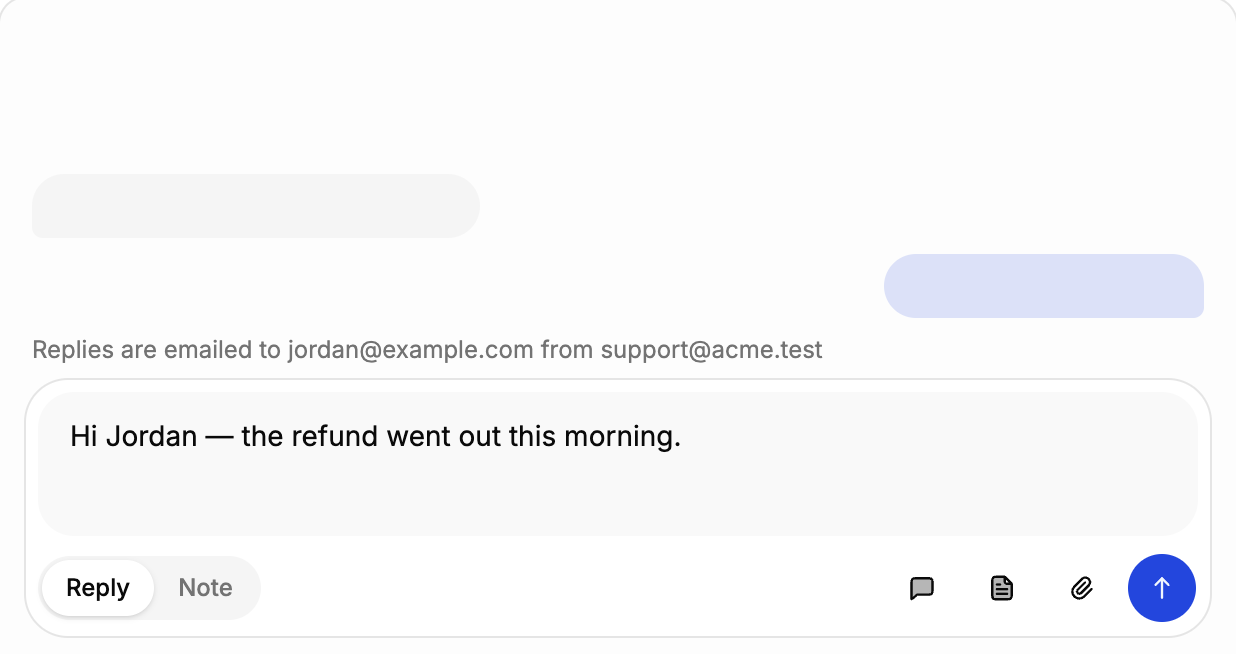
One composer for chat and email.
You reply to email in the same box you use for chat, with saved replies, help article links, @-mentions and internal notes. On email threads there’s one extra line showing who the reply is going to and which address it’s sent from.
Always know where it’s going
The recipient and sender are shown above the box every time.
Saved replies and articles
Type / for a saved reply, # to link a help article.
Notes stay internal
Switch to Note and the message stays with your team. Notes are amber, so you can’t mix them up.
- Forwarding verified
- Replies sent as support@acme.com
- Auto-replies and loops filtered
All the email basics
Reliable threading
Replies join the right conversation, even weeks later.
Flood protection
Incoming mail is rate-limited, so a misbehaving script can’t flood your queue.
Inline images
Screenshots pasted into an email show up inline in the thread.
Classified on arrival
Tagged with topic, urgency and mood before anyone opens it.
Labels and assignment
Send billing emails to your billing team, using the same rules as chat.
One queue
Email, chat and Slack in one list, sorted by what needs you.
Lloyd Humphreys
Founder, Buzzer
Try it with a real email.
Bring a real support email and we’ll run it through the Support Agent from start to finish.
Book 30 minutes with Lloyd